


As video games have become extremely popular in this day and age, many people have become interested in creating their own video games. As technology has advanced, there are several game design software options out there for both beginner and experienced level developers – but with so much to choose from, it can be tough to find the best one for you.
In this article, we’ll explore the best game design software and what features to look for when choosing the right one for your skill level and budget. Why not also check out our blog on 15 Ideas for the Best Gaming Desk Setup in 2023?
Understanding the basics of game design software
Game design software has revolutionised the gaming industry, allowing developers of all abilities to create immersive and engaging video games. The capabilities of these programs have created games that captivate players around the world.
But before diving into the top software options, it’s important to understand what game design software actually is. Game design software is essentially a tool that allows game developers to create and design video games. It is a platform used to create the graphics, audio and coding, all in one place.
They can also program the game’s mechanics and rules, such as movement, physics and scoring. Games design software also allows developers to test and refine their games, ensuring they are fun, engaging and bug-free.
With the right software, users can bring their ideas to life and create games that are both visually stunning and highly functional.
Features to look for in game design software
When choosing game design software, there are several key features to consider. Here’s a breakdown of the main things you should look for
Graphics and visualisation capabilities: In the current gaming world, beautiful graphics are considered one of the most important things to gamers. It is what the user sees and experiences. Because of this, the software should have powerful graphic editing tools that allow developers to create stunning visuals for their games. Read more information on What Makes a Good Video Game here.
In order to create stunning graphics for gamers to enjoy, the software should also support 3D modelling and animation, as well as particle effects and lighting to give it that professional look and feel.
Coding and scripting options: The software should have a robust coding environment that supports a variety of programming languages, such as C++, Java and Python. It should also have a scripting engine that allows developers to create custom behaviours and interactions within the game.
Platform compatibility: The software should support the platforms on which the game will be released, such as PC, console or mobile. It should also provide tools for optimising the game’s performance on each platform.
Pricing and licensing: The ideal software should be affordable and offer flexible licensing options for users, such as monthly subscriptions or one-time purchases. It should also provide access to regular updates and technical support.
By considering these features, game developers can choose the right software for their needs and be on their way to creating games that are both visually beautiful and highly functional.
Top game design software for beginners
If you’re new to game development, it’s important to choose software that is easy to use and learn. However, with so many options available, it can be difficult to know where to start. That’s why we have created this list of some of the top options:
Unity

Source: Architosh
Unity is a popular game design software that is known for its user-friendly interface and versatility. With Unity, you can create games for a variety of platforms, including desktop, mobile and console. Additionally, Unity offers a wide range of tutorials and resources for beginners.
One of the great things about Unity is its active community. There are many forums and online communities dedicated to helping new users get started. You can also find a library of free assets, such as 3D models and sound effects, that can be used in your games.
Another advantage of Unity is its support for virtual and augmented reality. If you’re interested in creating immersive experiences, Unity is a great choice.
Price: You can start using Unity for free with basic tools and access, but the standard version is £369 per year, per person. For the more professional game developers or companies, you can upgrade to Unity Pro or Enterprise for the more advanced features and support.
Unreal Engine

Source: Unreal Engine
Unreal Engine is another popular game design software option. While it can be more complicated to use than Unity, Unreal Engine offers advanced capabilities such as high-end graphics and physics engines. The software also includes a robust set of tools for level design and character creation.
One of the standout features of Unreal Engine is its Blueprint visual scripting system. This allows you to create game logic without needing to write code. However, if you’re comfortable with coding, Unreal Engine also supports C++.
Like Unity, Unreal Engine has a strong community and many resources available. Additionally, Unreal Engine offers a marketplace where you can purchase assets and plugins to enhance your games. This is great for beginners that might not know where to start.
Price: You can learn for free or use the basic tools for just under £5 a month. However if you are serious about creating your own games and want to release them, then you will need to pay more.
Read here on Top 10 Games Made with Unreal Engine.
GameMaker Studio 2

Source: Steam
GameMaker Studio 2 is another user-friendly software which is typically used for creating 2D games. The program includes built-in tutorials and drag-and-drop features that make it easy to get started; these are big factors which make it so easy and great for beginners.
Additionally, for users that want to take their game to the next level, GameMaker Studio 2 offers coding capabilities for developers if and when they wish to use them.
One of the advantages of GameMaker Studio 2 is its affordability. The software is available at a lower price point than some of the other options on this list. Additionally, like the others, it also has a large community and many resources available.
If you’re interested in creating 2D or retro-style games, GameMaker Studio 2 is a great choice. The software has a built-in pixel art editor and supports retro-style sound effects and music.
Price: You can learn for free or use the basic tools for just under £5 a month. However, if you are serious about creating your own games and want to release them, then you will need to pay more.
To release on the web, PC or mobile then the plan starts from £9.99 a month. For the full package that can be released on consoles as well, it shoots up to a premium price of £79.99 a month.
RPG Maker MV
Source: Steam
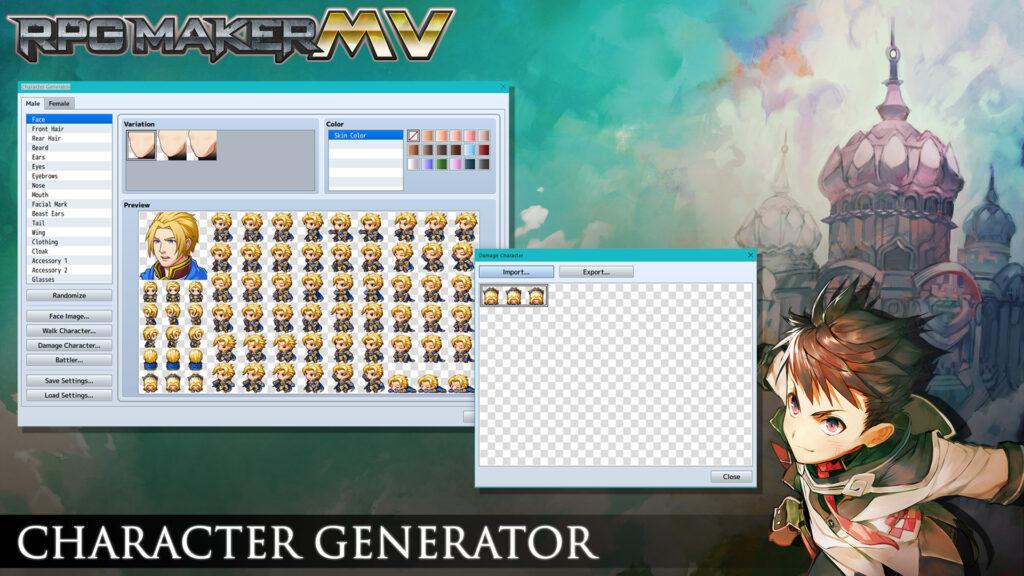
If role-playing games are your thing then RPG Maker MV might be the software for you! The software includes a wide variety of pre-built assets, including characters, maps and scripts. Additionally, RPG Maker MV includes an intuitive event system that allows you to create complex storylines and interactions.
You don’t need to have any coding knowledge or experience to use RGP Maker MV which makes it perfect for beginners. However, if you’re comfortable with coding, you can customise your games using JavaScript which is great that it offers that option for the more advanced.
Overall, there are many great game design software options for beginners. Consider your goals, wants, needs and the type of game you want to create when choosing the best software for you.
Advanced game design software for experienced developers
If you’re an experienced game developer looking for software that offers advanced capabilities then look no further than CryEngine and Godot Engine.
CryEngine
CryEngine has gained a reputation for its high-end graphics capabilities. This software includes advanced features such as real-time ray tracing and physics simulation, making it an ideal choice for developers who want to create visually stunning games.
Additionally, It also offers a broad range of game optimisation and bug testing tools that ensure your game runs smoothly and efficiently, leaving more time for game development.
Beyond its practical optimisation features, CryEngine offers a comprehensive set of tools for game development. These include a level editor, a visual scripting system and support for both C++ and Lua programming languages.
Whatever your game design aspirations may be, whether it’s a first-person shooter or an open-world adventure game, CryEngine is the perfect platform to bring your vision to life.
Price: CryEngine can be used for free with a 5% royalty charge.
Godot Engine
For game developers seeking complete control over their games, Godot Engine is the go-to option. This open-source software boasts a powerful, node-based scripting system that enables the creation of complex logic and interactions.
Godot Engine isn’t just used by hardcore developers. The software is designed to be user-friendly and accessible, even for beginners. It offers a range of tutorials that are available online so anyone can quickly learn how to create games.
In addition to its user-friendliness, the program offers extensive support for both 2D and 3D games, making it a great option for developers interested in creating games across genres.
Price: Godot Engine is open source and 100% free with no royalties.
In conclusion
The advancement in the digital age has allowed many powerful game design software to be built and highly accessible. It has completely revolutionised the gaming industry. But with so many software options available, it can be difficult to choose the right one.
However, by considering your budget and comparing features, you can find the perfect option for your game development needs! Take the time to research and compare different software options to ensure that you choose the best one for your project.
If you are serious about becoming a game designer or developer, Big Creative Education offers a Games Design course which also looks at things like VFX, to help kick-start your career!
BCE’s Games Design course will equip you with the skills you need to break into the games design industry. Bring your ideas to life while learning concept art, 2D & 3D design, audio design and more at BCE’s cutting-edge Digital Future Campus.
Sign up today and get started on what could be the next best game!